
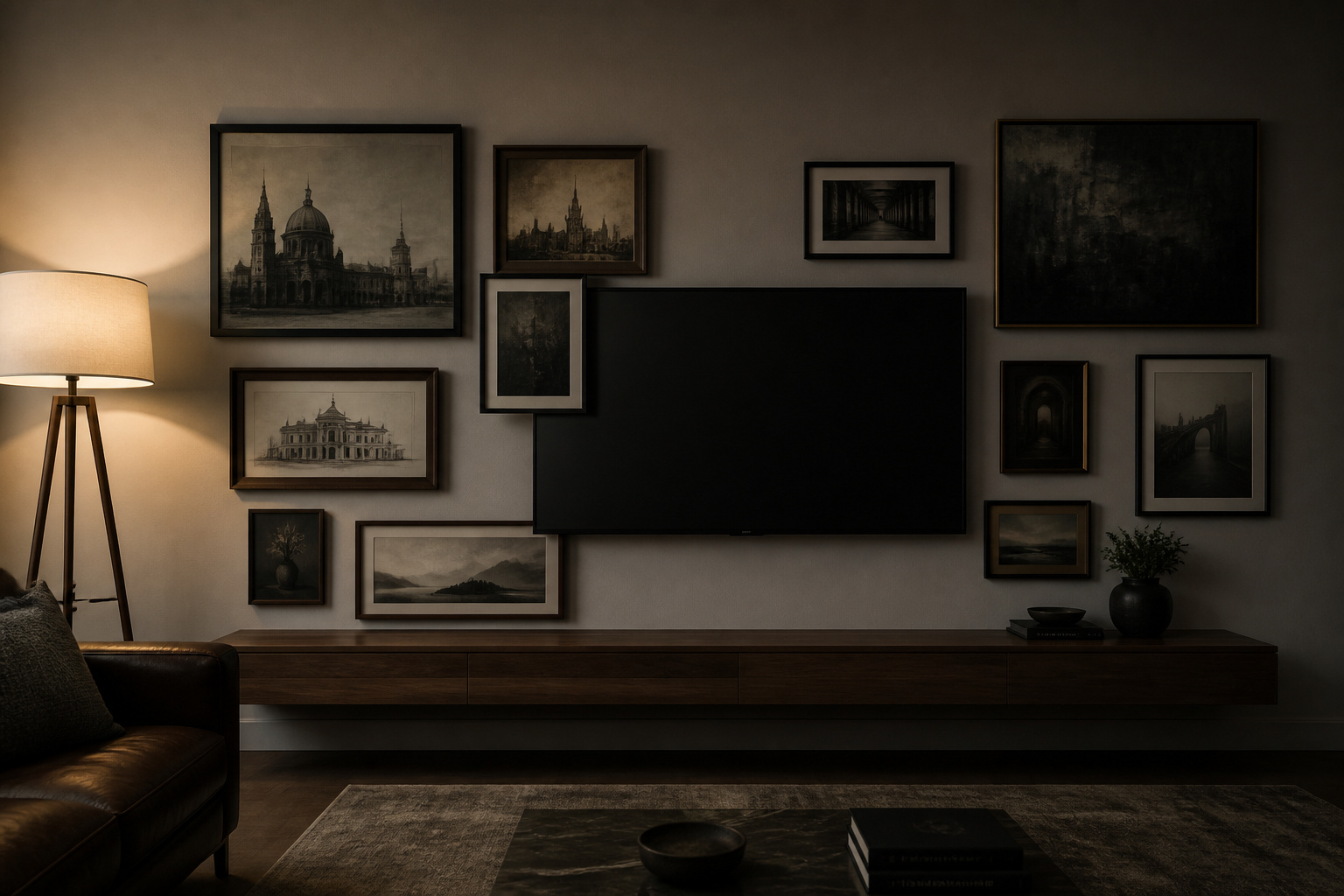
Picture the moment before the film starts: the room is composed, your eye moving easily across a wall of frames, and then it snags — on the one black rectangle in the middle, switched off, dead, pulling at your attention like a hole in the picture. That snag has nothing to do with the art you chose. It is the result of one decision — where the screen sits and what it sits among — and once you see the screen not as a disruption but as the largest frame on the wall, the whole arrangement reorganises itself around it.
TL;DR
- Place the TV off-centre — roughly one-third from an edge — and build more frames on the longer side; a symmetric, centred screen reads as a shrine no matter how good the art is.
- Surround it with dark-toned, matte art in black, dark walnut or matte metal frames; the low contrast lets the off screen sink into the composition instead of punching a hole in it.
- Hide the cables before the first frame goes up — an in-wall kit (around $30–$50, two small drywall cuts) or paintable surface raceway is what separates a finished wall from a job half-done.
The Before: Why a Gallery Wall Around a TV Usually Goes Wrong
What the eye does when a black rectangle sits in the middle of coloured art
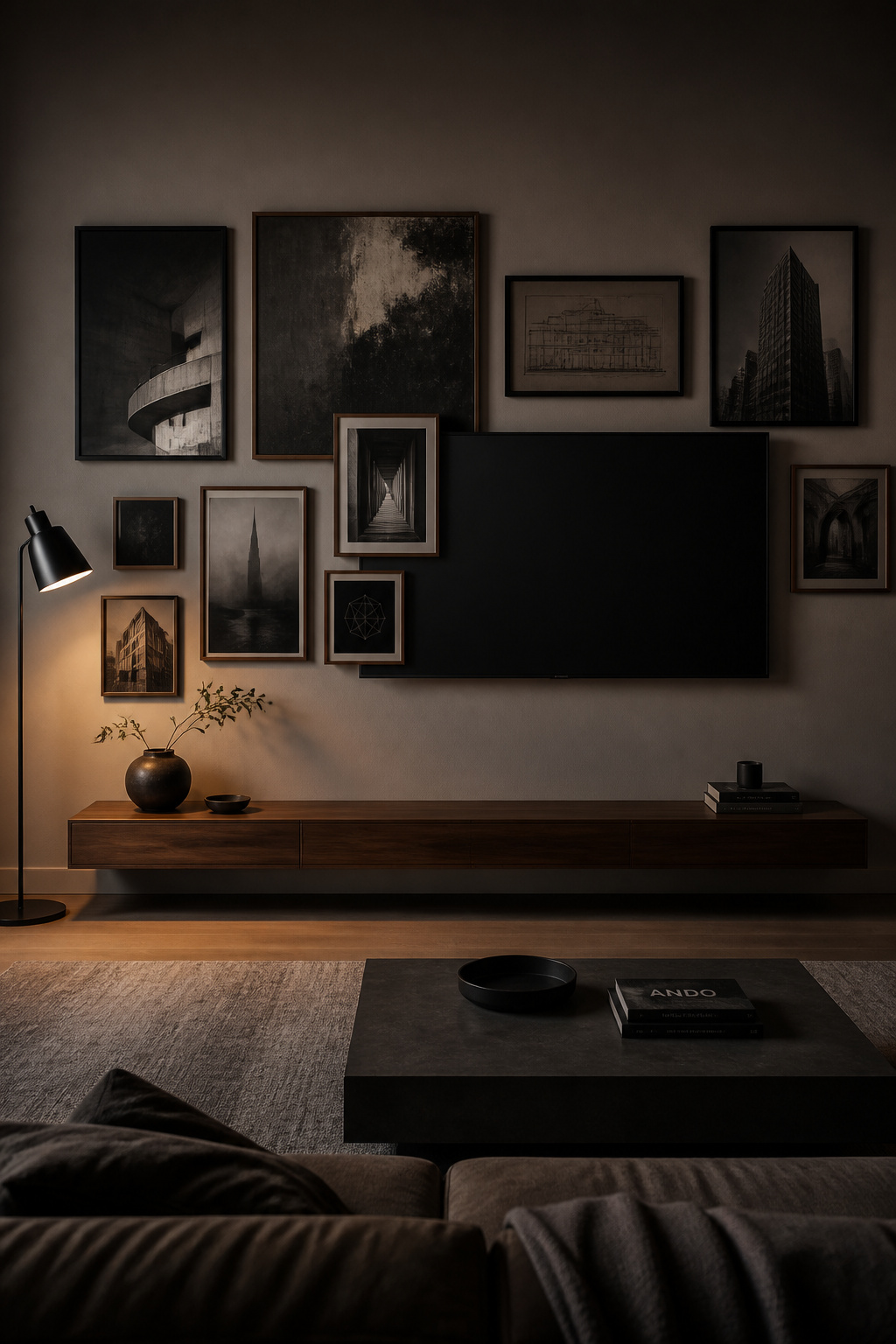
A switched-off screen is not neutral — its dark value behaves like a visual black hole, and the brighter and more saturated the art around it, the harder it pulls. Surround a black rectangle with colour-rich frames and you have built a contrast trap. The fix starts before you hang anything. Darker tones in the quadrant holding the TV — charcoal, deep navy, a dark green wall behind it — shrink the gap between the screen’s value and its surroundings, and the off TV stops announcing itself.
The symmetry trap: why centring art around the TV makes both worse
Centre the screen and flank it with matched frames, and you have built a mantelpiece. Bilateral symmetry signals “this is the important thing” to the viewer’s eye, so the matched pairs do not dissolve the TV’s dominance — they confirm it. Interior designers describe the result bluntly: the wall “reads like a shrine.” The art loses, because it becomes decoration arranged in service of the screen, and the screen loses too, because nothing makes a black rectangle look more like a black rectangle than a tidy frame around it.
The principle that changes the whole wall: treat the screen as a frame, not a disruption
Stop designing around the TV and start designing with it. Imagine the screen as the largest frame in the arrangement — a wide landscape rectangle in a field of portraits and squares — and suddenly it has a job rather than a problem. Play with rectangles of different sizes around it and the TV “will look like an intentional piece within the framed artwork, especially when it’s turned on.” That is the single move the rest of the article builds on, and it sits inside the larger discipline of designing a gallery wall for your main living space.
Asymmetric Placement: Why the TV Should Not Be the Centre
Moving the composition’s optical centre off the screen
The optical centre of any arrangement sits a touch above its geometric centre; asymmetric balance sets the heavier elements near that centre and the lighter ones farther out. On a TV wall, the screen must not be the heavy element at the middle. Push the TV to roughly one-third from one edge and cluster more frames on the larger side. An L-shaped run of frames off one corner of the screen reads as intentional and draws the eye across the wall, so the TV becomes one node in the composition rather than its anchor.
The viewing distance reality: where the TV must be for comfortable watching
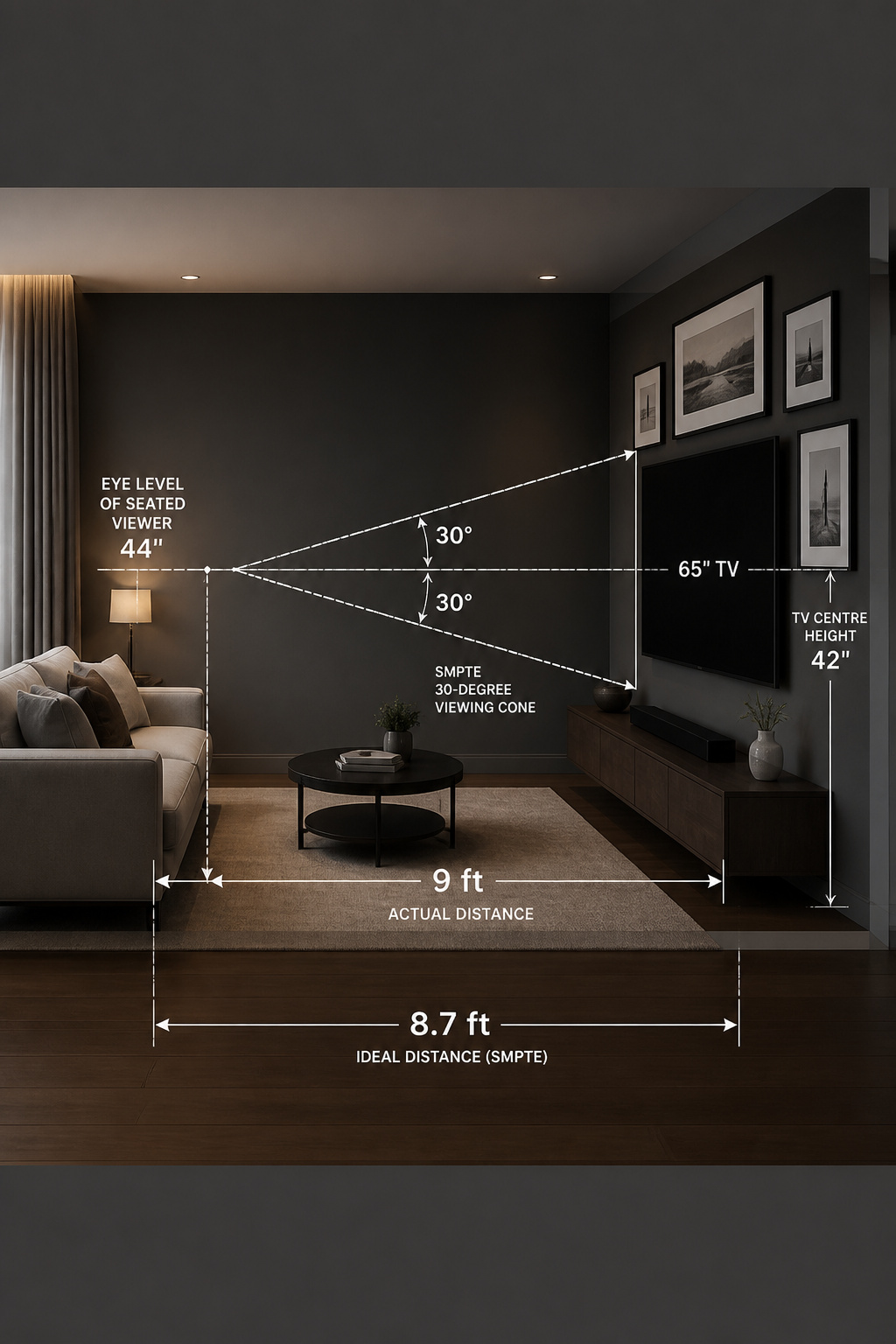
This is where my trade and a designer’s part company: the TV placement dictates the art, not the other way around. The screen has to live where you can watch it comfortably. SMPTE’s mixed-use standard is a 30-degree viewing angle — about 1.6× the screen diagonal, so a 65-inch TV wants roughly 8.7 feet of seating distance. Height matters as much: centre the screen near seated eye level, around 42 inches from the floor, which for a 65-inch set puts the bottom edge about 24 inches up. Fix those two numbers, then compose around them.
Balancing asymmetry so the wall reads as intentional, not unfinished
Asymmetry fails when it looks accidental, and one discipline prevents that: the bounding rectangle. Every frame, the TV included, should fit inside one imaginary outer rectangle — uneven on the inside, clean on the outside. Keep the spacing honest: hold a consistent 2–3 inches between every piece across the whole arrangement; tight clusters in one spot and wide gaps in another are what read as unfinished. Limit yourself to two dominant frame finishes with a third as an accent, and the varied placement reads as curated rather than as a pile that accumulated.
Art That Absorbs a Black Screen: Tone, Size, and Subject
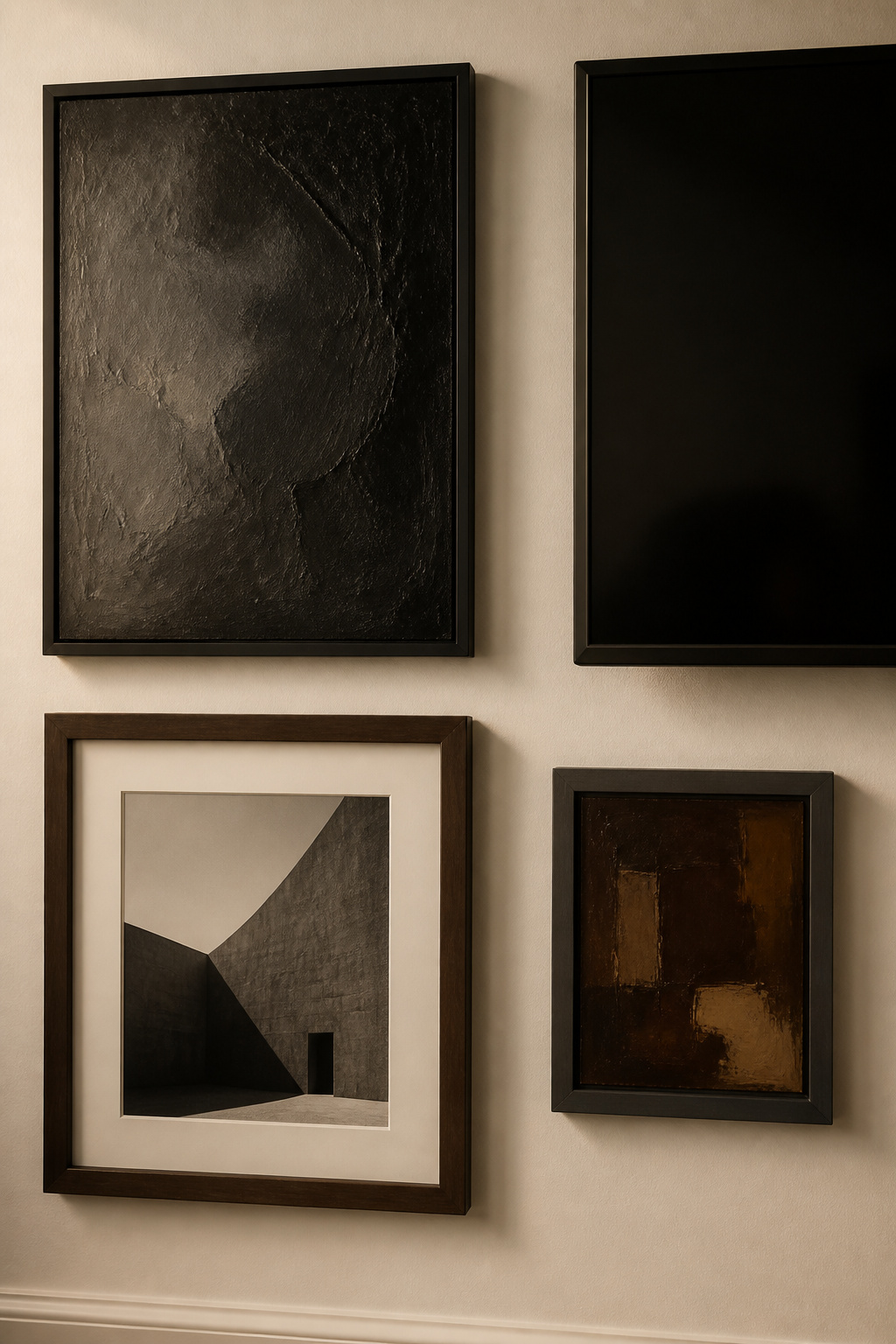
Why dark-toned and matte art pulls a black screen into the composition
Think of it as tonal continuity. Art with darker tones and matte surfaces — where you can see the brushwork and texture — sits compositionally close to the screen’s dark value, so the eye reads them as relatives rather than opposites. Black and white photography is the most reliable choice: its tonal range bridges naturally to the screen’s black state and never competes when content is playing. Canvas or board-mounted prints add the bonus of texture against the flat screen — dimensional brushwork makes art read as art, not as a second display.
Frame finish choices that bridge the screen to the wall: black, dark walnut, matte metal
Since the TV already wears a black border, matte black frames are the canonical answer — they dissolve the line between bezel and frame so the borders become one language instead of competing objects. Matte rather than glossy matters here for a practical reason a home-theater eye never ignores: matte finishes reduce glare around a screen. Vary within the dark family with dark walnut and matte metal — gunmetal, aged iron — to bridge between pure black and the wall colour. Extend the treatment downward with a dark media console, and the screen sits inside a designed dark band rather than floating.
Subjects and scales that work: what to hang closest to the TV and what to keep away
Scale first: anything directly adjacent to the screen should be a medium-to-large frame, 11×14 inches and up. Tiny frames beside a big TV lose every time — the disparity makes the screen look even larger by contrast. For subjects right next to the screen, art curator Alex Bass of Salon 21 recommends “something that will not distract your eye too much,” and chose framed black and white photographs herself. Keep saturated colour prints and contemplative, face-forward portraits out of the immediate sight-line. For a whole-wall version of this logic, see a black and white scheme that swallows the screen.
Glare, Viewing Distance, and the Realities the Room Imposes
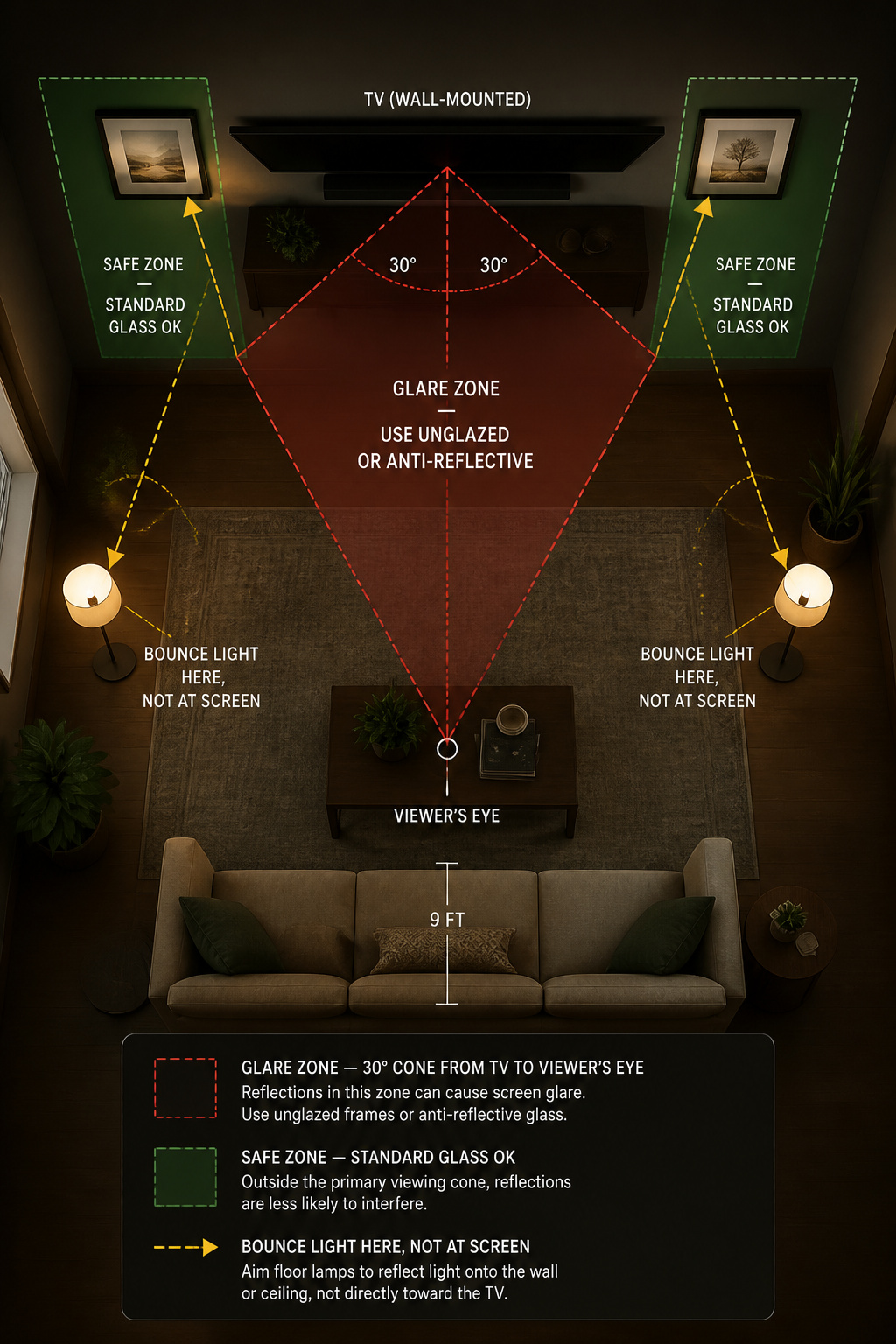
Glass-fronted art and screen glare: which frames to keep away from the sight-line
Standard picture glass reflects roughly 8% of the light hitting it, and inside the TV’s viewing cone that turns every glass-fronted frame into a secondary mirror competing with the picture. The simplest fix for the closest 2–4 frames flanking the screen — anything within about 15–20 degrees of centre from where you sit — is to skip glass entirely: canvas, board-mounted prints or metal prints. Where you need glazing on a piece near the screen, non-glare acrylic cuts reflections sharply (at a slight loss of sharpness), and museum-grade anti-reflective glass eliminates them without that penalty, for a real premium.
Viewing distance minimums and how they constrain where art can go
The same SMPTE 1.6× figure that placed the TV also fences off part of the wall: a 65-inch screen wants about 104 inches of clearance, a 75-inch about 120. Below those distances, 1080p pixel structure starts to show, though 4K content tolerates roughly half the distance. Frames hung tight to the screen edge fall inside the primary viewing angle and will catch lamp and window light. One more clearance to respect: do not let the lowest frames or the console block the TV’s IR sensor or soundbar — check the manufacturer’s sensor location before you fix the bottom row.
Light sources that fight both the screen and the art — and the simple fix
Two light sources sabotage a TV wall, and I kill them in this order. First, a recessed downlight aimed at the screen — it throws a hot-spot onto the glass and any framed glass nearby, so move it or redirect it before anything else. Second, a floor lamp sitting between the viewer and the TV. The professional standard for a room that mixes serious watching with displayed art is indirect, bounced light: uplights and shaded lamps that wash the ceiling and side walls instead of the screen, at a warm 2700–3000K that flatters both prints and skin tones on screen.
Cable Management: The Detail That Makes or Breaks the Finished Wall
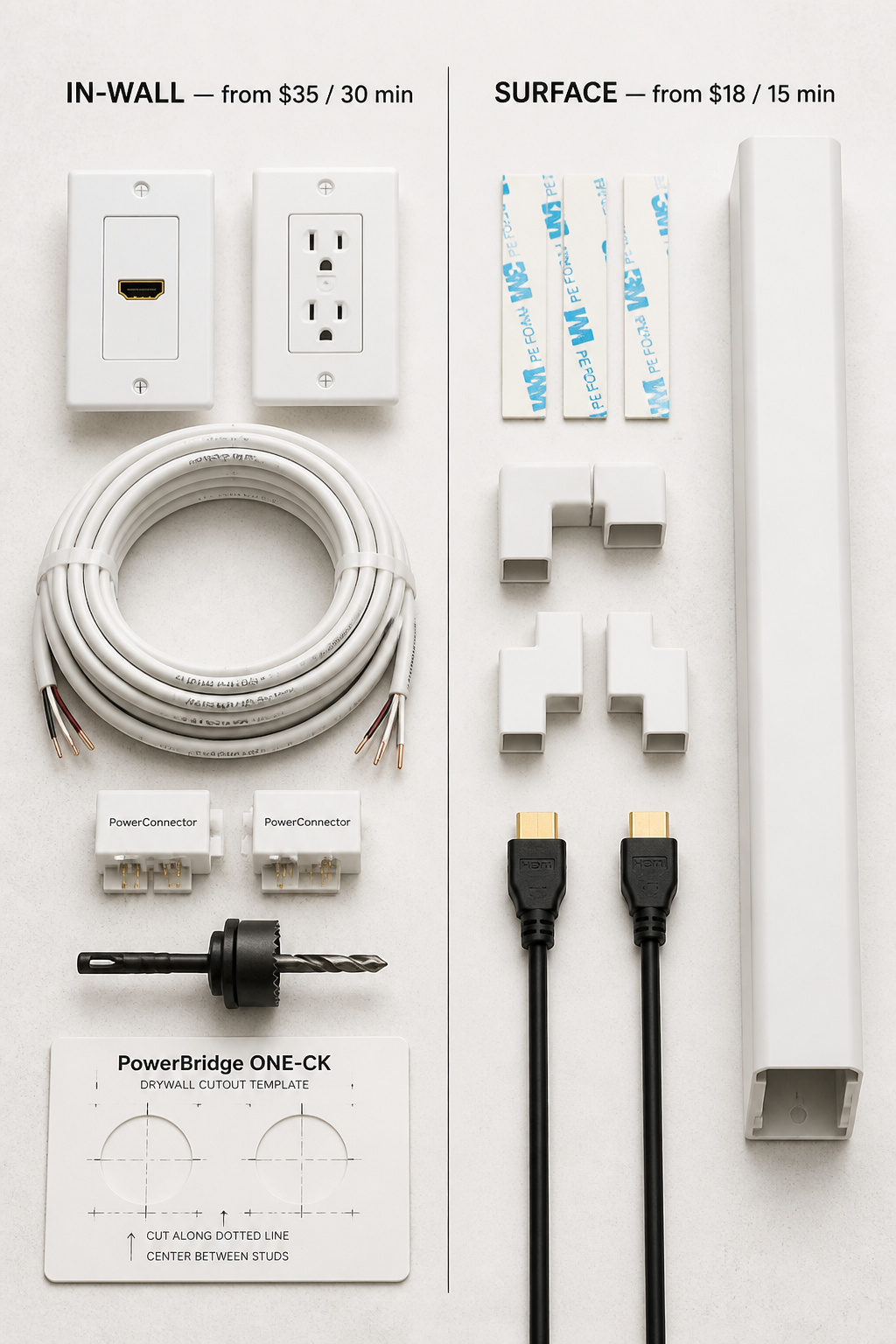
The three cable routes and what each requires from the wall
There are three honest routes for a wall-mounted TV. In-wall conduit kits — the PowerBridge ONE-CK, the Legrand Wiremold CMK70 — run power and low-voltage cables through two small drywall cuts; NEC Article 400.7(A)(11) permits this with the kit’s in-wall-rated cable connecting to an existing outlet, no electrician needed. Surface raceways stick to the wall, paint over, and peel off clean — the renter’s route. Furniture routing drops the cables straight into a media console below. One hard rule underpins all three: never run a standard extension cord through a wall. NEC 400.8 prohibits it, and it is a genuine fire risk.
In-wall conduit vs surface cable channels: an honest cost-effort comparison
The PowerBridge ONE-CK runs roughly $30–$50, takes about 30 minutes, gives you an outlet at TV level and a brush pass-through for HDMI, and needs around 3.25 inches of wall depth — true invisibility. A Wiremold surface raceway runs $8–$43, installs in 15 minutes, and does zero wall damage — but the honest limitation is that a painted raceway stays a thin visible line at oblique angles, not true invisibility. When you cannot cut the wall — concrete, rentals, complications — a raceway painted the exact wall colour is the right call, and the eye stops registering it within days.
How to integrate the media console so it reads as part of the composition
The console is where a good wall quietly fails: park a piece of furniture in front of the gallery and you have interrupted the composition. A floating media shelf — wall-mounted 16–18 inches up, extending 10–14 inches — erases that visual weight, leaving the wall as the primary surface and the shelf as a thin horizontal line. Leave 4–6 inches of breathing room between the console’s sides and the frames above so it reads as its own element, not a plinth. If components live behind doors, use perforated or louvred fronts so the remote still works, or add an IR repeater for $15–$40. Cable work comes before art, always — and a TV wall concentrates the spacing and scale mistakes to avoid more than any other.
Frame TVs and Art TVs: Where They Genuinely Help and Where They Don’t
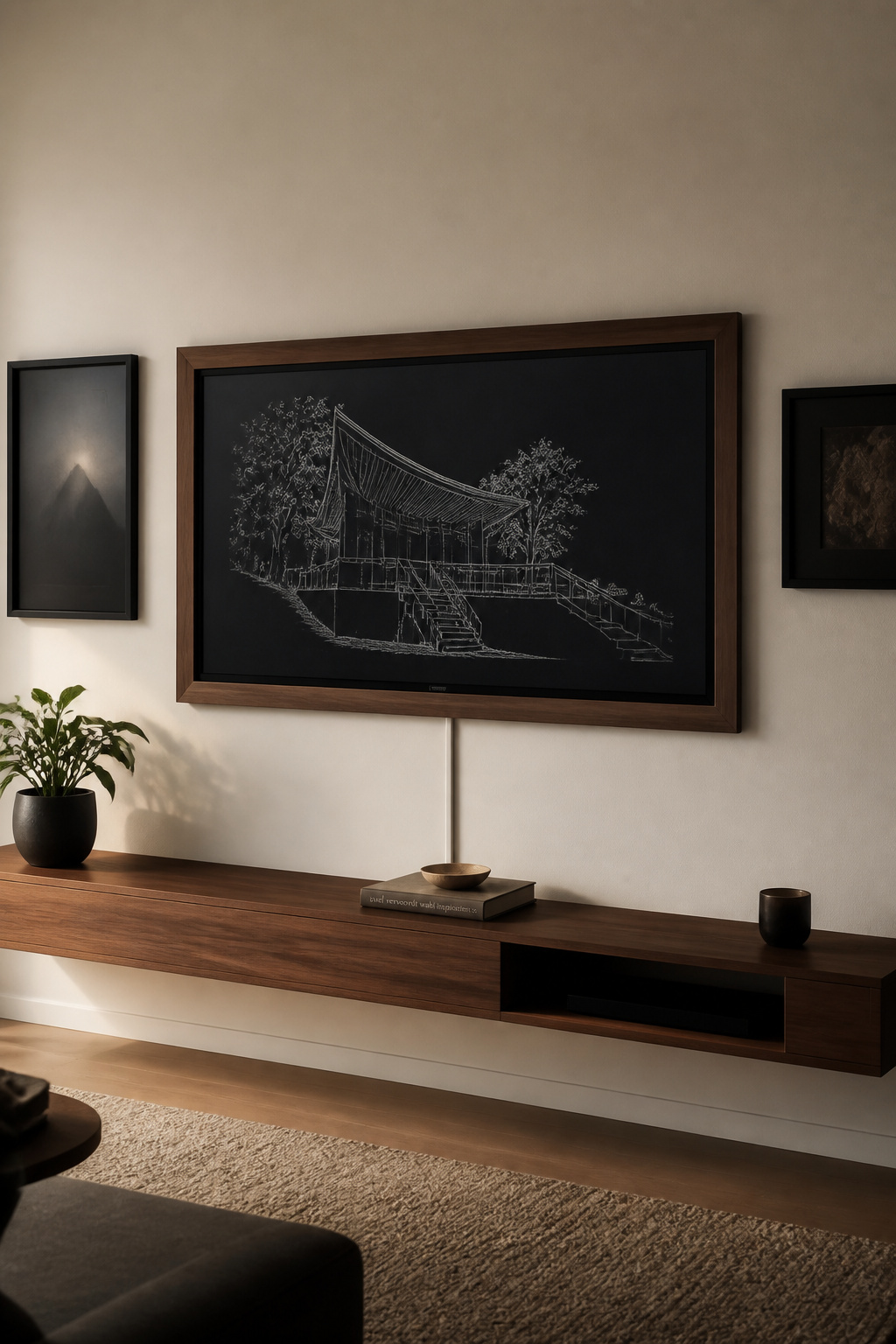
What a Frame-style TV actually does for a gallery wall composition
Samsung’s The Frame earns its place in this conversation because it attacks the two real problems directly. Its matte anti-reflective QLED panel and 1-inch depth mean it mounts nearly flush and kills the glare that punishes a standard screen, and in Art Mode it shows artwork rather than a black void when off — a motion sensor even switches the art off when the room empties. The 2025 model lists around $1,099 at 55 inches and $1,199–$1,299 at 65. The Art Store subscription is $4.99/month, but it is optional: Etsy digital art at $2–$10 a piece, loaded via the app, does the job for owners who would rather not subscribe.
The honest limitations: bezel width, display mode, and cost premium
Now the part the marketing skips, because diminishing returns are real. The standard Frame trades brightness for that matte coating — Tom’s Guide measured the 2024 model at about 431 nits SDR, notably dimmer than similarly priced standard sets, which bites in a bright south-facing room. The picture-frame bezel that makes it look like art is sold separately, roughly $50–$100, adding a visible border around 2.69 inches wide — though that figure comes from a third-party measurement guide rather than Samsung’s spec sheet, so treat it as a ballpark. Art Mode also drops the refresh rate to save energy. The Frame Pro fixes the brightness at about 1,000 nits, but the 65-inch jumps to roughly $2,097.
When a standard TV in a well-designed arrangement outperforms an art TV in a poorly designed one
This is the verdict I give clients who arrive sold on a Frame. The art TV improves the off-state and the depth — it does nothing for composition, tonal strategy, or cable management. Bolt a Frame onto an unresolved wall and you have made the same problems more expensive, not smaller. A standard 65-inch QLED runs $600–$800 against the Frame’s ~$1,199; that $400–$600 premium is fully justified when the off-state in an art-integrated wall is the priority, and hard to justify in a bright room used mainly for movies and sport. The Frame is excellent. It is the last decision on this wall, not the first.
The snag you started with was never about the television. It was about a screen given no role to play. Set it off-centre, ring it with dark matte art and matching frames, route the cables out of sight, and tame the lamps that fight it, and the rectangle dissolves into the wall it belongs to. The TV is still there, ready the second you want it. You have stopped seeing it as the problem and started seeing it as one frame among many — which is the whole trick, and now it is yours to hang.
FAQ
Should a gallery wall be centred around the TV?
No. Centring the TV symmetrically makes it the undeniable focal point. Place it roughly one-third from one edge and extend the gallery more generously on the larger side, so the eye travels across the wall rather than stopping at the screen. If architecture forces the TV dead centre, vary frame sizes and heights to break the symmetry instead.
Can you hang art above the TV in a gallery wall?
Yes, with two constraints. Leave at least 6 inches between the top of the TV and the lowest frame above it to avoid crowding, and size that art to roughly 60–80% of the screen width so it neither dwarfs the screen nor looks like a postage stamp. Use unglazed art or anti-reflective glazing, since the frame sits in the TV’s sight-line.
How do you hide TV cables in a gallery wall?
For a permanent, invisible result, an in-wall kit such as the PowerBridge ONE-CK (about $30–$50) routes power and HDMI through the drywall in roughly 30 minutes, permitted by NEC 400.7(A)(11) with no electrician. For rentals, paintable surface raceways conceal cables with zero damage. Never run a standard extension cord through the wall — NEC 400.8 prohibits it.